Am I using Claude too fast? Now you know.
Usage Monitor is a lightweight floating widget that keeps track of your personal Claude usage in real time. At a glance, see how much usage you have remaining, whether you’re consuming it faster than expected, and whether you have enough capacity to keep working comfortably — no more guessing at your limits.
| No. | Indicator | Reads | Remark |
|---|---|---|---|
| 01 | Usage windows tracked | 5 h × 5 | Outline = time elapsed, fill = usage consumed |
| 02 | Weekly pace | 7 days | Usage bar plus seven daily cells |
| 03 | Resets In | Live | Countdown to the current window’s refresh |
| 04 | Data accessed beyond usage | 0 | No conversations, prompts, projects or files |
Synced with Claude in real time. Usage Monitor is an independent utility, not affiliated with or endorsed by Anthropic.
Pace, not just totals
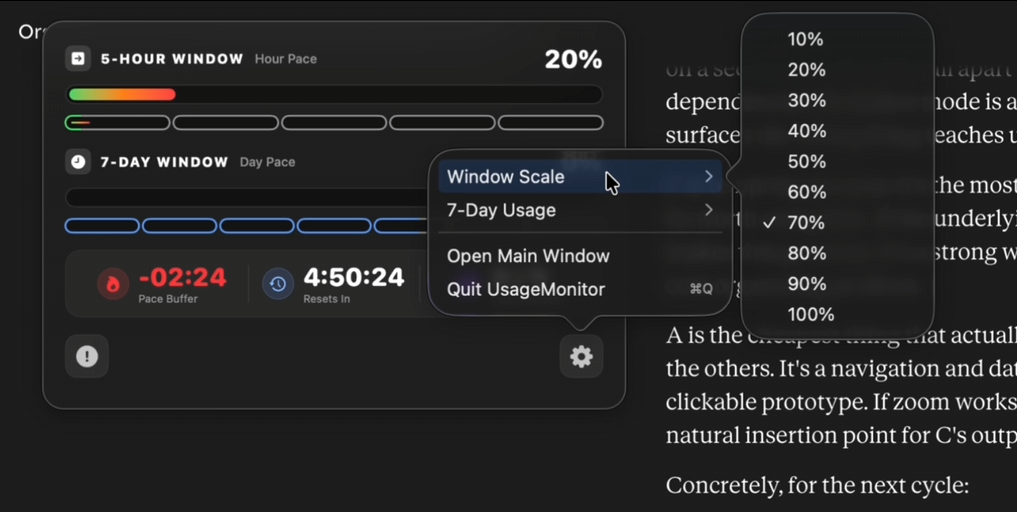
Five cells map your 5-hour usage windows: the outline shows how much time has passed, the fill shows how much quota is used. Fill behind outline — you’re healthy. Fill ahead — you’re burning too fast. One glance answers it.
Know your margin
Pace Buffer shows how much breathing room you have between your usage and the clock. Resets In counts down to your next refresh. Hours At Cap shows how much of the five-hour window may be affected by hitting the usage cap.
Just your usage. Nothing more.
Only the usage data that powers the widget is read. Conversations, prompts, projects and files are never accessed; nothing is collected, stored or transmitted. It never modifies Claude or acts on your behalf.
Sized to stay out of the way
A floating widget you can resize freely: open the detailed view for the full picture — daily bar, window cells, weekly pace, bottom status — or switch back to the compact view for a cleaner, less distracting screen.
“Usage Monitor gives you the clarity to focus on your work — not your limits.”
Release notes, nothing else
New features and important fixes for the widget. No promotions, no countdowns — a monitoring tool should not manufacture anxiety.